
Software
Backup cards: two cards, one run
At MTBO events and championships, many competitors now carry a backup SIAC and punch both cards at every control. meshO Manager treats both cards as theirs: read either or both, and the result is worked out from whatever was read. Here is how to set it up, and what you'll see at the download desk, case by case.

Tate Needham
meshO · · 8 min read

A SIAC that goes flat halfway round, a card knocked off a handlebar map board on a rough descent, a punch that didn’t register at speed. At a club event that’s a bad day for one rider. At a championship it’s a lost title, and nobody did anything wrong.
So more and more competitors carry two cards: their own and a backup, both punched at every control. It’s become ordinary in MTBO, where riders punch at speed and a card can take a knock, and at elite and championship foot races.
Until now, timing software tended to treat the second card as a stranger. Its radio punches showed up as an unknown card, and reading it at the finish either matched nobody or replaced the runner’s card number. In meshO Manager, both cards belong to the runner. Read either one, or both, in any order, and the result is worked out from whatever was read.
The whole job in three steps
- Before they start, record the second card on the competitor.
- When they come back, read their first card. Read the backup only if the first card is a Missing punch.
- Check the result. There’s nothing to assign: every read goes to the runner, and the result is worked out from whatever was read.
That’s it for almost every runner. The rest of this guide shows what you’ll see in each situation.
| They bring back | What you see | Result |
|---|---|---|
| Both cards, both fine | Two reads, both theirs | OK, on the first card’s times |
| Both cards, the first failed partway | The first read is a Missing punch; the second turns it OK | OK |
| Only the backup | One read, theirs | OK, on the backup’s times |
| Both cards, each missed a different control | Each read alone is a Missing punch | OK by default |
| Both cards, both missed the same control | Both reads are a Missing punch | Missing punch: they really did miss it |
Recording the second card
Open the competitor from the Competitors list, the dashboard, or with Ctrl+F from any screen. Beside Card number is a small card button, greyed out while there’s no second card. Click it, type the backup’s number and click Save.
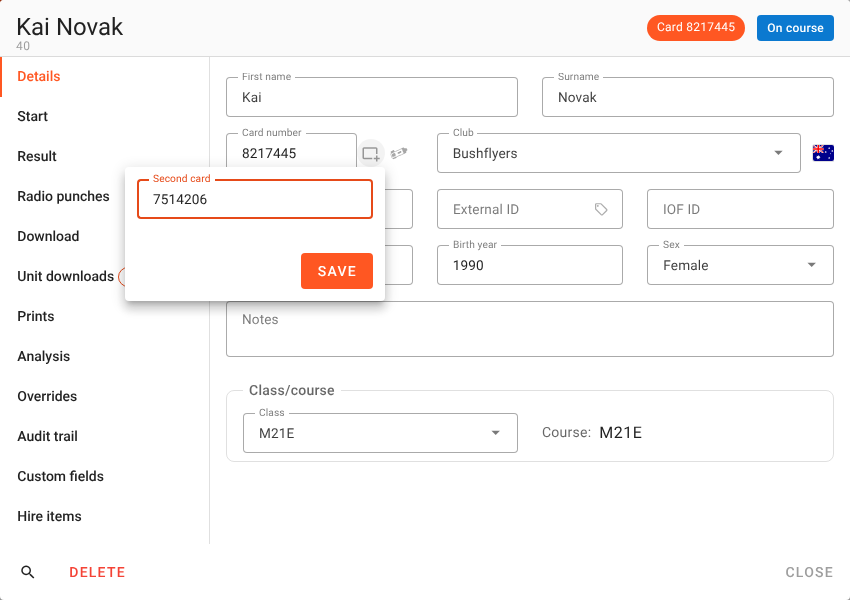
Once it’s saved, the button is filled in, its tooltip names the second card, and the header chip reads Card 8217445 + 7514206, so anyone who opens the runner can see at a glance that they carry two.
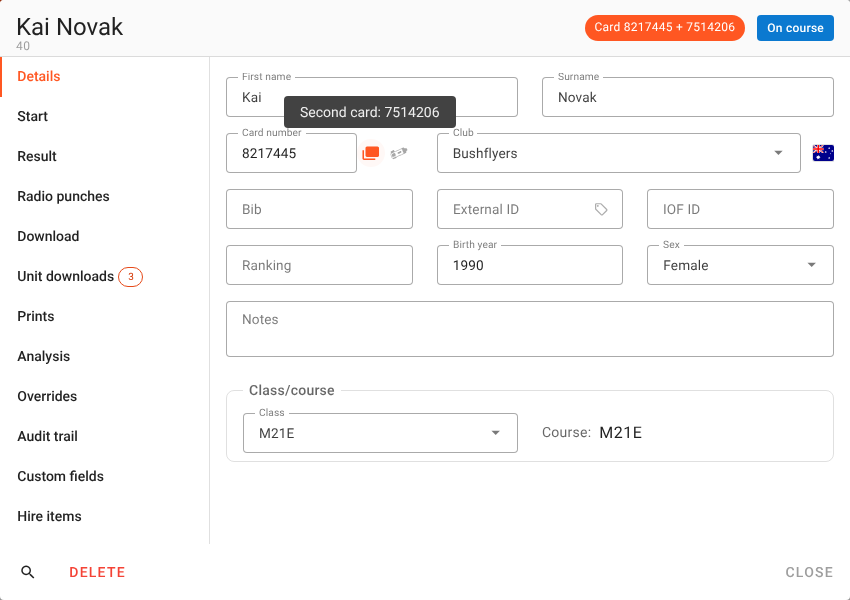
Save typing at the next event. Record the second card in Settings → Competitors too, and it comes with the competitor into every event they’re entered in. If your entries arrive as an IOF XML entry or start list with two cards per person, both are read in, and Manager writes both back out when it exports one. Orienteering JSON carries both as well.
Two rules Manager enforces. A second card can’t be the same as the runner’s first card, and it can’t be a card another entry already holds, as either their first or their second card. Two people on one card is how a result ends up with the wrong person, so Manager refuses it and names who holds the card.
At the download desk: the first card first
Read the runner’s first card, the one they’re entered on. If it comes up OK, that’s their result, and they’re done. Only if it’s a Missing punch, read their backup as well, and let the backup fill the gap.
Reading a card takes time, and at a busy finish every read is somebody else waiting in the queue. For almost every runner both cards worked, so reading the backup as well would double the queue to change nothing.
It doesn’t matter if a runner gets it the other way round. If they put their backup in first, it’s matched to them and gives their result on its own. Reading the first card afterwards is fine, and so is not reading it at all. If both cards are read and both worked, the second read changes nothing: the banner shows the same result again, with the line Both cards merged — card … alone was OK, and no second splits slip prints.
Example 1: the first card failed partway
Kai Novak’s first card stopped recording partway round. Read on its own, it’s a Missing punch, and the banner names the controls it doesn’t have. Then Kai hands over the backup. The moment it’s read, the banner turns green, and a line under the result says it was worked out from both cards, and that the first card on its own was MP.
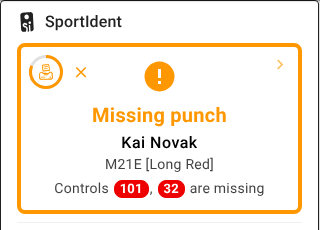
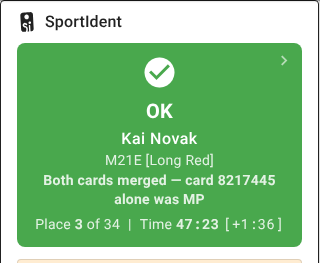
Figure 4. How the result is made. The first card’s punches stand; the backup fills the gap.
Tip: a mispunch that ends in an unbroken run of missing controls looks like a failed card, not a wrong turn. If a runner’s first read looks like that, ask whether they carried a backup.
Both reads are now Kai’s. In the Card downloads list, both rows carry his name and both say OK, because each row shows the runner’s result.

His card number stays 8217445. Reading the backup never changes either card on the competitor.
Example 2: only the backup comes back
A rider’s first card came off on a descent and is somewhere in the forest. Read the backup. It’s matched to the rider by its number, and the banner shows their result just as it would for their first card. The result stands on the backup’s times.
If the first card turns up later and is read, it joins the backup, and the result is worked out from both.
Example 3: each card missed a different control
Sometimes neither card has everything. Wilhelm Norton punched both cards at every control, but his first card didn’t register at one control and his backup didn’t register at another. Each read on its own is a Missing punch. Read together, the two cards hold every control.
Figure 6. Two cards, two different gaps. Merged, they make one complete run. Scored separately, both are mispunches.
By default Manager combines the two cards into one run, so once the second card is read Wilhelm is OK. That’s how most organisers think of a backup card: proof that the rider was at every control, on one card or the other. Open his Download tab and Result from shows which rule was used.
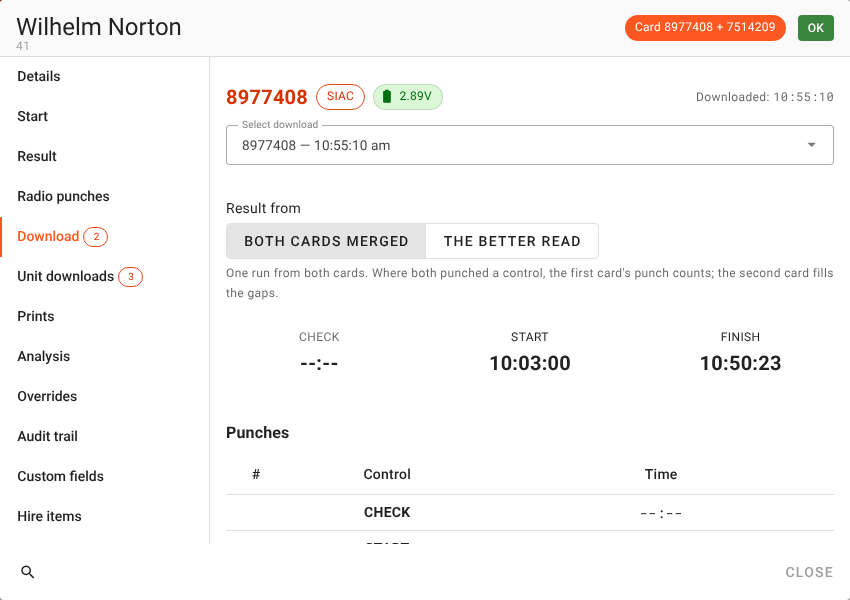
If your event’s rules say each card has to stand on its own, change the rule for that runner (see Merged, or the better read).
Example 4: both cards missed the same control
If both cards are missing the same control, the runner really did miss it. Two cards can’t invent a punch that neither of them recorded, so the result is a Missing punch whichever rule is chosen.
Figure 8. The same gap on both cards. A real mispunch, and a backup card doesn’t change it.
If you’re not sure, open the runner’s Download tab and switch between the two reads with Select download to compare their punches control by control.
Merged, or the better read
Once reads of both cards are held, the runner’s Download tab shows Result from, with two choices:
- Both cards merged (the default). One run from both cards. Where both punched a control, the first card’s punch counts; the backup fills the gaps.
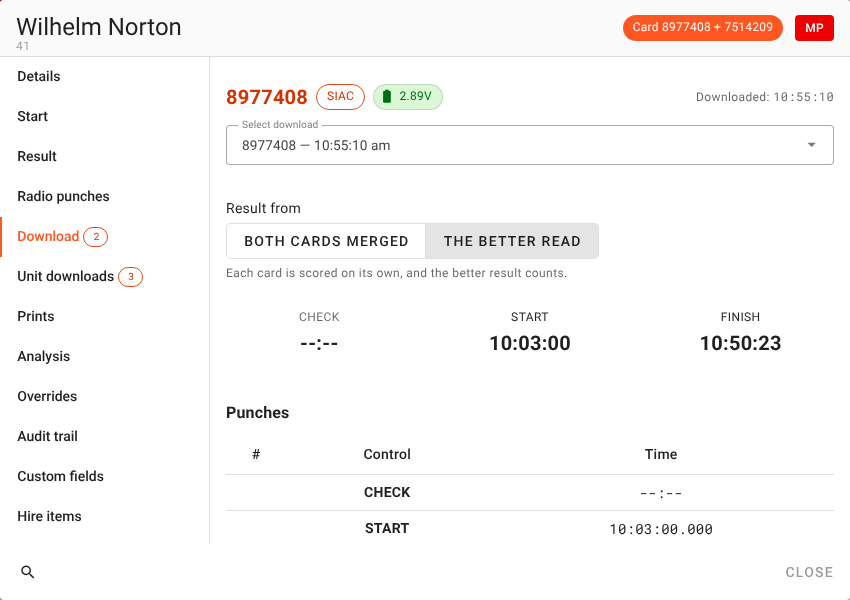
- The better read. Each card is scored on its own, and the better result counts. If they score the same, the first card counts. When a card is read, the banner says which one was used, such as Second card used — first card 8217445 was MP, or Not used — their other card 7514206 is OK for a read that doesn’t count.
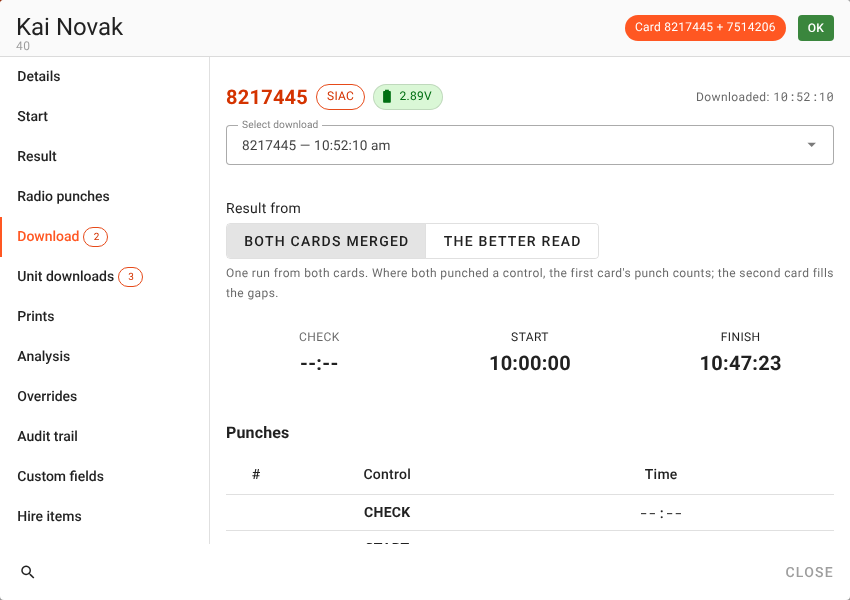
The choice is per runner and takes effect straight away. For Wilhelm, The better read makes him a Missing punch, because neither of his cards on its own has every control.
Leave it on Both cards merged unless your event’s rules say otherwise. You can switch back at any time; nothing is lost either way, because both reads are kept exactly as they were read and the result is worked out from them each time.
Radio controls and two cards
A runner punching two cards sends two radio punches from every radio control: one per card. Both count as the runner’s, so the backup no longer shows up as an unknown card on the On course list or in the radio punches feed.
Where both cards punched the same control within 30 seconds of each other, the first card’s punch is used and the other is set aside, so the runner appears once, at one time. A backup punch at a radio control the first card didn’t punch counts on its own. It’s the same rule the download follows, so the live results during the race and the downloaded result at the end agree, and the answer doesn’t depend on which card’s punch the radio happened to deliver first.
One splits print, not two
If you print splits at the download, a runner who hands over two cards gets one slip, not two:
- Both cards worked. The second read leaves the result as it was, so nothing more prints.
- The first card was a mispunch, and the backup turns it OK. If the mispunch slip was still being held back while you corrected things, the OK slip prints in its place.
When something doesn’t look right
The backup came up as an unknown card. It wasn’t recorded on the runner when it was read. Record it now. If the runner already has a read of their first card, the waiting read of the backup is picked up as soon as you save. If they don’t, assign it to them from the downloads list.
“Card … is already held by …, so it cannot be a second card.” Two entries can’t share a card. Check whose card it really is, and take it off the other entry first.
A read of the wrong card is on the runner. Unassign it from the downloads list, as for any read, and the other read stays. Or take the second card off the runner (the card button, then Remove), and its read goes with it, waiting in the list to be assigned.
The same card was read twice. That isn’t a backup: it’s one card used again, and Manager asks whether it’s another run, as it would for anyone.
A checklist for a two-card event
- Tell competitors in the event information whether backup cards are allowed or required, and that both must be punched at every control.
- Record the second cards before the start: from the entry list if it carries them, otherwise in Edit competitor, and in Settings → Competitors for regulars.
- Decide the rule for a runner whose cards each missed a different control. Merged is the default; if your rules say each card stands alone, plan to switch those runners to The better read.
- Brief the download desk: read the first card; read the backup only after a Missing punch. A runner who reads the backup first, or reads both, is fine too.
- Watch for unknown cards in the downloads list and on the On course list. An unknown card that turns up just after a known runner is often their unrecorded backup.
Getting it
It’s in meshO Manager 2026.11.16 and later. The Competitors carrying two cards page of the Manager docs has the details, and Downloading cards covers the download desk in general.