

Technical
Specifications, integrations, how the mesh works, and where your data lives. For step-by-step instructions, see the documentation.
Specifications
Every unit, in detail


Integrations
What meshO works with
| System | With | How |
|---|---|---|
| meshO Manager | meshO Prime | meshO Prime plugs into the Manager server over USB |
| MeOS | meshO Prime | Tested. Radio punches sent to the event software over USB |
| OE | meshO Prime | Tested. Radio punches sent to the event software over USB |
| O-Lynx | meshO Prime | Tested. Radio punches sent to the event software over USB |
| SI Timing | meshO Prime | Tested. Radio punches sent to the event software over USB |
| Other event software | meshO Prime | Standard punch messages over USB, for any software that accepts them |
| SportIdent SIAC (AIR+) | meshO Control | Receives the card’s SRR radio punch at any unit in beacon mode set to “send last record” — BSF7, BSF8, BSF9, BS11 |
| SportIdent BSF8-SRR | meshO Control | Receives every punch at a control fitted with one, SIAC or older SI-Card |
| SportIdent and EMIT card readers | meshO Manager | Card downloads in the browser (Chrome, Edge, Firefox 151+); EMIT MTR4 and 250 |
| Eventor | meshO Manager | Create an event and import entries |
| IOF XML, Orienteering JSON | meshO Manager | Import and export of events, entries and results |
| liveresultat | meshO Manager | Publish live results online |
| Livelox | meshO Athlete (coming soon) | Stream tracking positions |
SportIdent compatibility
Which units and cards work
meshO Controls receive SportIdent short-range radio (SRR) punches from SIAC cards and from BSF8-SRR units. Set each unit at a radio control to “send last record” in SportIdent Config+ (“Send the last punch” under AIR+ radio in meshO Manager).
| SportIdent unit | What it is | Set in SI Config+ | SIAC | Older SI-Card |
|---|---|---|---|---|
| BSF7 | Direct punching, or direct and contactless (AIR+, about 30 cm) | “Send last record” | YesThe SIAC sends the punch | NoRead at download |
| BSF8 | Direct punching, or direct and contactless (AIR+, about 30 cm) | “Send last record” | YesThe SIAC sends the punch | NoRead at download |
| BSF9 | Direct punching, or direct and contactless (AIR+, about 50 cm) | “Send last record” | YesThe SIAC sends the punch | NoRead at download |
| BSF8-SRR | As BSF8, with its own SRR radio that sends every punch it takes | “Send last record” and “AutoSend” | YesThe SIAC sends the punch | YesThe unit sends the punch |
| BS11-BS, BS11-BL | Contactless only (AIR+, about 180 cm and 300 cm), for MTBO and SkiO | “Send last record” | YesThe SIAC sends the punch | Not used — SIAC only |
Any SportIdent unit in beacon (AIR+) mode can be a radio control, because it is the SIAC that sends the punch by radio. When most competitors carry a SIAC, most punches arrive live, so there is no need to change every control to a BSF8-SRR. At the controls that matter most — the start, the finish, the last control and pivots — a BSF8-SRR also catches punches from older SI-Cards.
How the mesh works
Radio to radio, back to the arena
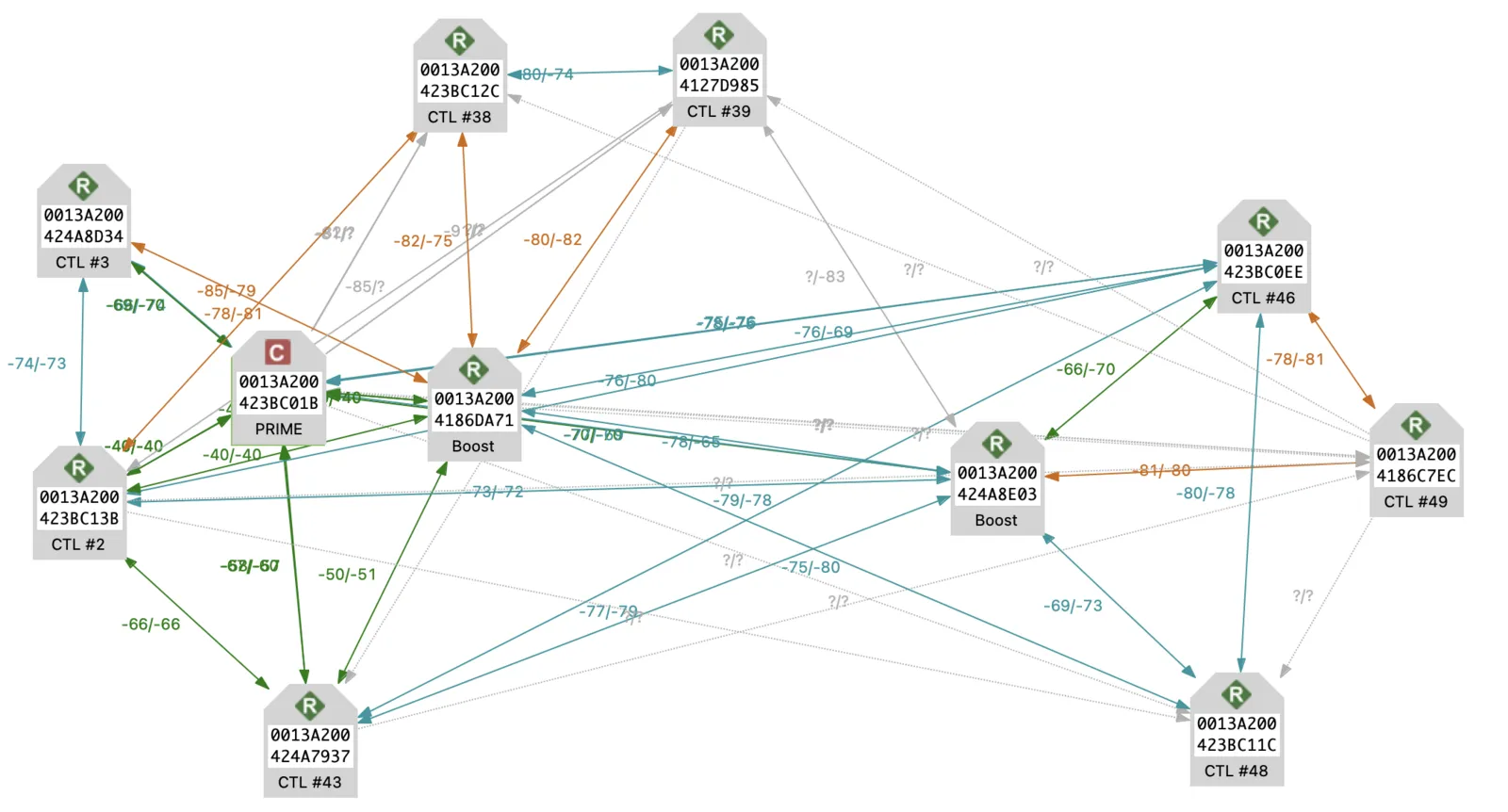
meshO Prime creates the network. Each meshO Control joins it through whichever radios it can reach, and passes punches along until they arrive at meshO Prime. If a radio drops out — a stand knocked over — the network routes around it. Each meshO Control stores hundreds of punches and delivers them once it has a path again, so a punch that reaches a control always reaches the arena.
How far apart radios can be depends on the terrain — see the range guide below.
Range
How far apart radios can be
Range depends on vegetation, topography and distance, and no one can predict it exactly. On the day, signal strength between radios is monitored and gaps are closed.
Rules of thumb between two radios. Behind a hill or a long way out, an intermediate radio at a rough midpoint, or a radio on a tall antenna pole, bridges the gap.
Inside meshO
Key meshO innovations
Sub-GHz radio
Longer range and better reach through vegetation and terrain than 2.4 GHz, with less interference, lower power and a shorter antenna. Earlier radio controls used 2.4 GHz, which proved unreliable in difficult terrain.
A self-healing mesh
Every meshO Control is also a repeater. Punches hop from radio to radio back to meshO Prime, and the network routes around a radio that drops out.
Our own SRR radio
A custom radio for SportIdent short-range radio keeps meshO compatible with the SIAC cards and units clubs already own, at about half the parts cost — which lowers the cost of radio controls for clubs.
A purpose-built circuit board
Designed in-house for manufacture at scale, with the components integrated on one board for fewer parts and a sturdier unit.
Real-time firmware
Custom firmware on a real-time operating system keeps every radio responsive under load and recovers from faults on its own.
Power management
Integrated charging and battery monitoring, low-power operation and no power switch: each unit switches on with a magnet and can be powered down remotely, and its four onboard radios shut down when they are not needed.
GPS on board
Every radio knows where it is. Live View in meshO Manager shows each radio on the map, with the signal strength of the links between them, so organisers can check that controls are where they should be and see how the network is holding up.
Guaranteed delivery
Each meshO Control stores hundreds of punches and delivers every one, even if the network is down or not fully up when the first competitors start.
Deep sleep, scheduled wake
Radios can be put into a deep sleep days or weeks before an event and wake at a set time, ready for the start without anyone visiting the controls.
Updates over the air
Firmware updates are installed over the air, so new features and fixes reach every unit without opening one up or plugging it in.
Built for large events
Designed for hundreds of competitors on the course at once.
Your event software
Works with MeOS, OE, O-Lynx, SI Timing and meshO Manager, so clubs don’t have to change how they time events to use radios.
Security and data
Where your event’s data lives
meshO Manager
- The event is stored on the computer running Manager
- Runs on your local network; no internet needed during the event
- Manager control screens are protected by a PIN
- Every change is kept in the event’s audit trail
- Results go online only when you publish them