Software
Using the meshO Manager API: a practical guide with examples
Everything meshO Manager does on screen, it does through its own web API: the operator’s console, the rego desk, the results screens and the commentary feed all read and write the same endpoints. You can use them too. Scripts, screens of your own and whole apps can be built on them. This guide walks through the API with working examples in curl, Python and JavaScript, from reading results and scoring your own competitions to building an event, feeding in punches and listening for live changes.

Tate Needham
meshO · · 30 min read
meshO Manager is a web application. The screens you click through are a front end running in a browser, and behind them is a server that keeps the event and answers requests over HTTP. Nothing the front end does is special: when an operator adds a late entry, the browser sends a POST. When a download station reads a card, it sends the card’s punches in a POST. When a results screen shows a new finisher, it was told by a live notification and then fetched the competitor with a GET.
That means anything Manager can do, your own software can do too. That might be a script that runs quietly in the background, a screen of your own design, an app on a phone, or a link to another system. Some of the things you could build:
- live results on your own website or in a club chat;
- scores for a competition of your own, run alongside the race: country against country, club against club, or the fastest time up a hill-climb leg;
- a screen of your own for a sponsor, a commentator or a finish chute;
- entries loaded straight from your own registration system;
- radio punches fed in from another timing system;
- an alarm when a competitor has been out too long.
This guide is for the person who builds that: a club’s technical volunteer, a developer helping out at an event, or an organiser who is comfortable with a terminal. Every request and response in it was run against a real meshO Manager while it was being written.
The API is the one meshO Manager uses itself, so anything you can click, your own software can do too.
Before you start
Where the API is
The API lives on the computer running meshO Manager, under /manager/api. On that computer it is:
http://localhost:5154/manager/apiFrom another computer on the same network, use the server’s IP address, which Settings → Server shows in its Access links table. The examples below use 192.168.0.133; replace it with yours. With HTTPS turned on, the same API is also on port 5155. The documentation page Reaching the server: name or IP explains which address works from which device.
The quickest way to check you can reach it:
curl http://192.168.0.133:5154/manager/api/Version{"version":"2026.3.4.1","commit":"local","cloudMode":false}Browse it in Swagger
Every Manager carries a live, clickable list of its own endpoints at /swagger. Open http://192.168.0.133:5154/swagger in a browser and you can read what each endpoint takes and returns, and try it. The machine-readable OpenAPI description is at /swagger/v1/swagger.json, which most languages can turn into a client.
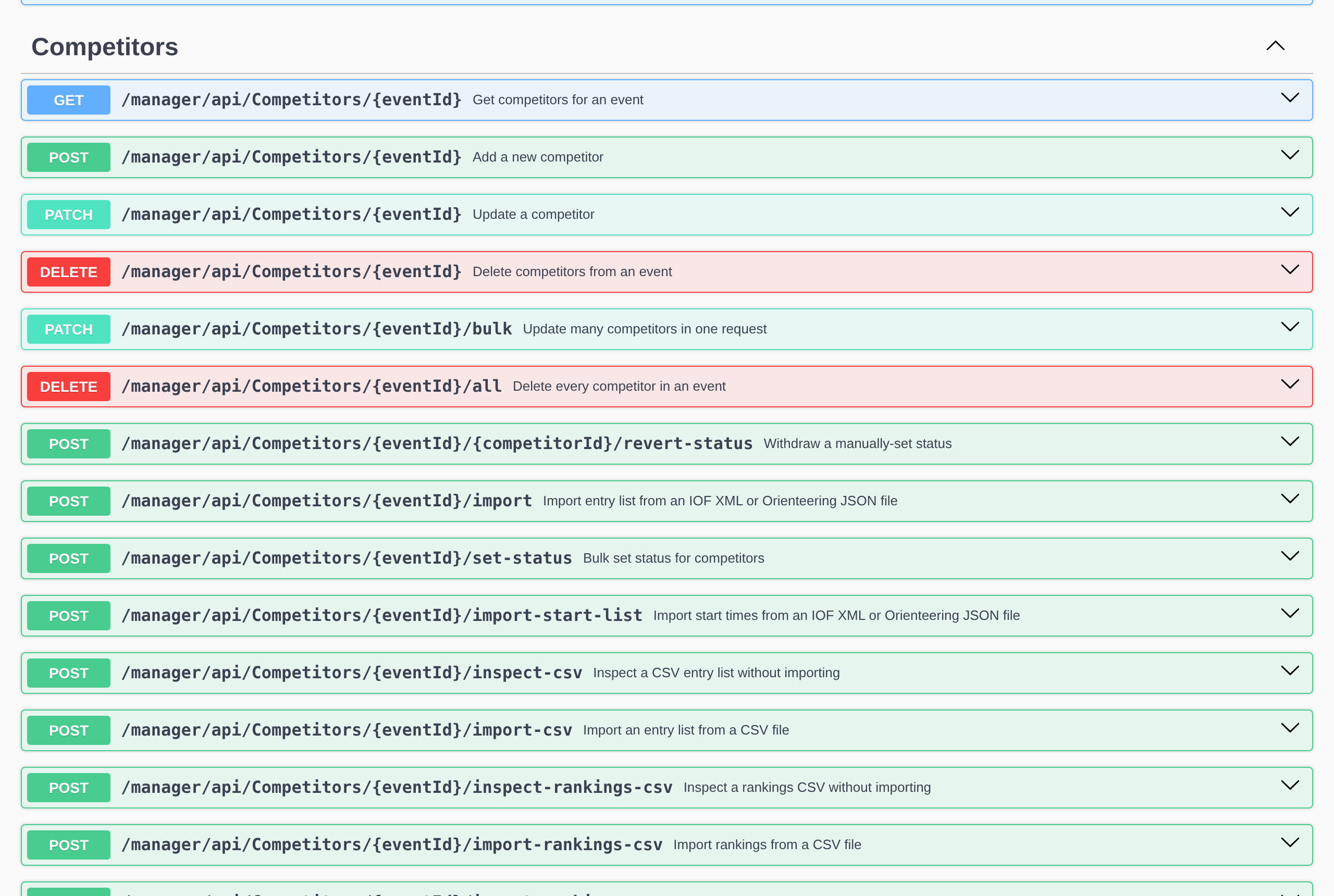
/swagger on your own Manager.Practise on a sample event
Don’t learn the API on the event you are about to run. meshO Manager ships with sample events you can install with one request:
curl http://192.168.0.133:5154/manager/api/Events/samples[{"sampleId":"01-individual-sprint","name":"Sample : Individual sprint race","installedEventId":null},
{"sampleId":"02-club-punching-starts","name":"Sample : Club event with punching starts","installedEventId":null},
{"sampleId":"03-mass-start-forked","name":"Sample : Mass start with forked courses","installedEventId":null},
{"sampleId":"04-international-relay","name":"Sample : International elite relay","installedEventId":null}]curl -X POST http://192.168.0.133:5154/manager/api/Events/samples/01-individual-sprint/addThe individual sprint has 620 competitors in 10 classes, with results, which is plenty to experiment with. To try writing to a real event without risk, copy it with POST /manager/api/Events/{id}/duplicate and work on the copy.
How the API is shaped
Almost everything in an event (competitors, classes, courses, controls, clubs, teams, radio punches) follows one pattern:
| Request | What it does |
|---|---|
GET /manager/api/Competitors/{eventId} | Every competitor in the event |
GET /manager/api/Competitors/{eventId}?ids=4,9,12 | Just those competitors |
POST /manager/api/Competitors/{eventId} | Add one |
PATCH /manager/api/Competitors/{eventId} | Replace one (see the warning below) |
DELETE /manager/api/Competitors/{eventId}?ids=4,9 | Delete those |
Swap Competitors for Classes, Courses, Controls, Clubs or Teams and the same five requests work. A few things hold everywhere:
- The event id is the event’s folder name, a date and a number:
2026-10-14.01is the first event created for 14 October 2026.GET /manager/api/Eventslists them all. - JSON property names are camelCase, and enumerations are strings:
"status": "OK","eventType": "Individual". - Times of day are milliseconds since midnight, in fields ending
Milliseconds, nearly always with a ready-formatted twin beside them:"finishTimeMilliseconds": 28908578and"finishTime": "08:01:48". Allocated start times are whole seconds since midnight (allocatedStartTimeSeconds). Durations, such as a race time, are milliseconds too.-1means “none”. - Asking for an id that doesn’t exist returns an empty list, not an error:
?ids=999gives[]. An event that doesn’t exist does give a404. - There is no paging. A
GETreturns the whole list. Even a large event is a few hundred kilobytes.
Reading an event
Reading is the most common use, and the simplest. Start with the list of events:
curl http://192.168.0.133:5154/manager/api/EventsEach event comes back with its settings. The fields you will use most are these:
{
  "eventId": "2026-10-14.01",
  "name": "Sample : Individual sprint race",
  "date": "2026-10-14",
  "status": "Complete",
  "eventType": "Individual",
  "discipline": "Sprint",
  "startUnitNums": [1],
  "finishUnitNums": [2],
  "checkUnitNums": [3]
}
status is one of Future, InProgress, Interrupted, Complete or Abandoned. Only one event can be in progress at a time, and this asks which one:
curl http://192.168.0.133:5154/manager/api/Events/liveidIt answers with the bare id as plain text (2026-10-14.01), or with nothing at all when no event is running.
A competitor
GET /manager/api/Competitors/{eventId} returns everything Manager knows about each person. Here is one, trimmed to the fields most scripts need:
{
  "id": 1,
  "name": "Stefan Ellis",
  "givenName": "Stefan",
  "familyName": "Ellis",
  "si": 8013026,
  "bibNumber": "",
  "classId": 1,
  "clubId": 2,
  "startTime": "07:53:30",
  "startTimeMilliseconds": 28410000,
  "finishTime": "08:01:48",
  "raceTime": "8:18",
  "raceTimeMilliseconds": 498578,
  "status": "OK",
  "position": 36,
  "behind": "+4:08",
  "isPreliminaryResult": false
}
si is the card number. classId and clubId point into the event’s classes and clubs, which you fetch the same way. status is one of:
| Status | Means |
|---|---|
None | No result yet, and not known to have started |
InForest | Started and not yet back: on course |
OK | A valid result |
MissingPunch | Mispunched |
DidNotStart, DidNotFinish, Disqualified, Overtime | DNS, DNF, DSQ, over time |
OutOfCompetition, NoTiming, NotParticipating, Cancelled | Less common outcomes |
Example: live results on your own website
This Python script writes an HTML results table for every class. Run it every minute and copy results.html to your website, or adapt it to post into a club chat.
import html
import requests

MANAGER = "http://192.168.0.133:5154/manager/api"
EVENT = "2026-10-14.01"

def get(path):
    r = requests.get(f"{MANAGER}/{path}/{EVENT}", timeout=10)
    r.raise_for_status()
    return r.json()

classes = sorted(get("Classes"), key=lambda c: c["order"])
clubs = {c["id"]: c["name"] for c in get("Clubs")}
competitors = get("Competitors")

rows = []
for cls in classes:
    rows.append(f"<h2>{html.escape(cls['name'])}</h2><table>")
    field = [c for c in competitors if c["classId"] == cls["id"] and c["status"] == "OK"]
    for c in sorted(field, key=lambda c: c["position"]):
        rows.append(
            f"<tr><td>{c['position']}</td><td>{html.escape(c['name'])}</td>"
            f"<td>{html.escape(clubs.get(c['clubId'], ''))}</td>"
            f"<td>{c['raceTime']}</td><td>{c['behind']}</td></tr>")
    rows.append("</table>")

with open("results.html", "w", encoding="utf-8") as f:
    f.write("\n".join(rows))
On the sample sprint, the first rows come out as:
<h2>M21</h2><table>
<tr><td>1</td><td>Niklas Brennan</td><td>Bushflyers</td><td>4:10</td><td>--:--</td></tr>
<tr><td>2</td><td>Blake Reynolds</td><td>Garingal Orienteers</td><td>4:11</td><td>+0:01</td></tr>
<tr><td>3</td><td>Leo Cameron</td><td>Newcastle Orienteering Club</td><td>5:27</td><td>+1:17</td></tr>
Manager has already worked out each place and time behind, so the script never does any timing arithmetic of its own. Let Manager do that: it applies the event’s rules (sub-second timing, time adjustments, tie breaks) in one place, and a script that recalculates them will one day disagree with the screens.
The script runs on a computer that can reach Manager. A web page on your club’s website cannot call Manager from a visitor’s browser: Manager is on the event’s own network, which a phone or a computer at home can’t reach. Publish from a script, as here, or use cloud sync, which puts finished events on events.mesho.live for you.
Example: who is still out
Safety is the other common read. This lists everyone on course, with the last radio control that heard them, longest unseen first. It is the same picture as the On course list in Manager, in a form you can send to a phone.
import requests

MANAGER = "http://192.168.0.133:5154/manager/api"
EVENT = "2026-10-14.01"

competitors = requests.get(f"{MANAGER}/Competitors/{EVENT}", timeout=10).json()
punches = requests.get(f"{MANAGER}/RadioPunches/{EVENT}", timeout=10).json()

# The latest radio punch heard from each card.
last_heard = {}
for p in punches:
    if p["siNum"] not in last_heard or p["punchTimeMilliseconds"] > last_heard[p["siNum"]]["punchTimeMilliseconds"]:
        last_heard[p["siNum"]] = p

out = [c for c in competitors if c["status"] == "InForest"]
for c in sorted(out, key=lambda c: last_heard.get(c["si"], {}).get("punchTimeMilliseconds", -1)):
    p = last_heard.get(c["si"])
    seen = f"control {p['controlNum']} at {p['punchTimeFormatted']}" if p else "not heard since the start"
    print(f"{c['name']:<24} card {c['si']:<9} started {c['startTime']}  last seen: {seen}")
print(f"{len(out)} still out")
Jordan Blake card 8001006 started 10:30:50 last seen: not heard since the start
Casey Morgan card 8001005 started 10:39:10 last seen: control 32 at 10:45:50
2 still outEach radio punch carries the control (controlNum), the card (siNum), when the control recorded it (punchTimeMilliseconds, punchTimeFormatted) and when Manager received it (timePunchReceived). Our article Is everyone back? explains what a last radio punch can and can’t tell you about where someone is.
Scoring a competition of your own
Events often run a competition alongside the race: states or countries against each other, a club challenge, schools, or a prize for the fastest time up the big hill. meshO Manager’s results don’t know about your rules, and they don’t need to. Read the results, apply your rules, and show the answer.
Example: country against country
This scores every class on the same scale (10 points for first, 8 for second, down to 1 for eighth) and totals them by the country of each competitor’s club. A club’s country is its countryAlpha3, which IOF XML, OJSON and Eventor imports fill in and which you can set on the Clubs page.
from collections import defaultdict
import requests

MANAGER = "http://192.168.0.133:5154/manager/api"
EVENT = "2026-10-14.01"
POINTS = {1: 10, 2: 8, 3: 6, 4: 5, 5: 4, 6: 3, 7: 2, 8: 1}  # place -> points, in every class

def get(path):
    r = requests.get(f"{MANAGER}/{path}/{EVENT}", timeout=10)
    r.raise_for_status()
    return r.json()

country_of_club = {c["id"]: c["countryAlpha3"] for c in get("Clubs")}
class_name = {c["id"]: c["name"] for c in get("Classes")}

totals = defaultdict(int)
by_class = defaultdict(lambda: defaultdict(int))
for c in get("Competitors"):
    if c["status"] != "OK" or c["position"] not in POINTS:
        continue
    country = country_of_club.get(c["clubId"]) or "?"
    totals[country] += POINTS[c["position"]]
    by_class[class_name[c["classId"]]][country] += POINTS[c["position"]]

for name, scores in sorted(by_class.items()):
    print(f"{name:<6}", "  ".join(f"{k} {v:>3}" for k, v in sorted(scores.items())))
print("TOTAL ", "  ".join(f"{k} {v:>3}" for k, v in sorted(totals.items(), key=lambda kv: -kv[1])))
M16 AUS 26 NZL 13
M21 AUS 18 NZL 21
M35 AUS 12 NZL 27
M45 AUS 28 NZL 11
M55 AUS 22 NZL 17
W16 AUS 26 NZL 13
W21 AUS 17 NZL 22
W35 AUS 31 NZL 8
W45 AUS 22 NZL 17
W55 AUS 19 NZL 20
TOTAL AUS 221 NZL 169Changing the rules is changing a few lines: count only each country’s best three in a class, give a junior class double points, or group by club instead of country by keying on clubId. Because the places come from Manager, the scores follow every correction the operator makes: a disqualification or a fixed mispunch changes the totals on the next run.
Example: the fastest hill climb
A leg prize needs the time between two particular controls. The OJSON results list has every competitor’s splits as data, each the time from their start to that control, so a leg is one split minus the one before it. This finds everyone who ran from control 103 straight to control 194, whatever their class:
import requests

MANAGER = "http://192.168.0.133:5154/manager/api"
EVENT = "2026-10-14.01"
FROM, TO = 103, 194  # the hill climb: from control 103 straight to control 194

# The OJSON results list: every competitor's splits, as cumulative times from their start.
# acceptUnsettled=true gives the results so far while the event is still running.
r = requests.get(f"{MANAGER}/ResultsExport/{EVENT}/json", params={"acceptUnsettled": "true"}, timeout=30)
r.raise_for_status()

legs = []
for cls in r.json()["classes"]:
    for p in cls.get("persons", []):
        splits = [s for s in p.get("splits", []) if s["status"] == "OK" and "time" in s]
        for a, b in zip(splits, splits[1:]):
            if a["controlCode"] == FROM and b["controlCode"] == TO:
                legs.append((b["time"] - a["time"], p["person"]["name"], cls["name"]))

for rank, (ms, name, cls) in enumerate(sorted(legs)[:10], start=1):
    print(f"{rank:>2}. {name:<24} {cls:<6} {ms // 60000}:{ms // 1000 % 60:02d}")
1. David Eastwood M21 0:18
2. Lucas Eastwood M21 0:18
3. Viktor Kirby M21 0:18
4. Ulrik Olsen M21 0:19
5. Blake Reynolds M21 0:21
6. Malcolm Talbot M21 0:21
7. Tobias Hemsley M21 0:21
8. Viktor Brennan M21 0:21
9. Harry Ridley M21 0:22
10. Callum Eriksson M21 0:23A competitor counts once they have punched both controls, so someone who mispunched elsewhere on the course still gets a leg time. If your prize says otherwise, also check p["status"] == "OK". Without acceptUnsettled=true, the export is refused until every competitor has a settled result, which is right for an official file but not for a prize you want to show during the day. With radio controls at both ends of the climb, you needn’t wait for downloads: each competitor’s radio splits arrive in GET /manager/api/CompetitorControlVisits/{eventId} while they run, and that is what the hill-climb screen further down uses.
The access PIN
Out of the box, anyone who can reach Manager on the network can read and change the event through the API. Most events should set an access PIN in Settings → Access protection. With a PIN set:
- Reading stays open. Every
GETworks without the PIN, because the spectator pages, results screens and info displays read the same endpoints and must keep working. Both read examples above work unchanged on a protected Manager. - Web pages from elsewhere read only the results, and only as the public. From meshO Manager 2026.10.15.01, a web page served from any address can read the endpoints the spectator screens use. It can’t read the settings or the competitors’ private details, it can’t write, and it never reads with your session, so a class whose results are quarantined stays hidden from it.
- Writing needs a signed-in session. Every
POST,PATCH,PUTandDELETEis refused with401 Unauthorizedand a headerX-Manager-Auth-Required: 1until you sign in.
You sign in by posting the PIN. The answer sets a cookie, managerAuth, that lasts 30 days:
curl -c cookies.txt -X POST http://192.168.0.133:5154/manager/api/auth/login \
-H 'Content-Type: application/json' -d '{"pin":"4821"}'{"success":true,"message":null}Send that cookie with every write afterwards (-b cookies.txt in curl). To check where you stand, GET /manager/api/auth/status returns {"protectionEnabled":true,"authenticated":true}. A wrong PIN returns 401 with {"success":false,"message":"Incorrect PIN"}, and every attempt takes at least a second, to make guessing slow.
In Python, a requests.Session keeps the cookie for you. The rest of this guide uses this small client, so save it as manager.py:
import requests

class Manager:
    def __init__(self, url, pin=None):
        self.api = url.rstrip("/") + "/manager/api"
        self.http = requests.Session()  # keeps the managerAuth cookie
        if pin:
            r = self.http.post(f"{self.api}/auth/login", json={"pin": pin}, timeout=10)
            r.raise_for_status()

    def _check(self, r):
        if not r.ok:
            try:
                err = r.json()
                raise RuntimeError(f"{r.status_code} {err.get('messageKey')}: {err.get('message')}")
            except ValueError:
                r.raise_for_status()
        if not r.content:
            return None
        if "json" in r.headers.get("Content-Type", ""):
            return r.json()
        return r.text

    def get(self, path, **params):
        return self._check(self.http.get(f"{self.api}/{path}", params=params, timeout=30))

    def post(self, path, body=None, **params):
        return self._check(self.http.post(f"{self.api}/{path}", json=body, params=params, timeout=30))

    def patch(self, path, body):
        return self._check(self.http.patch(f"{self.api}/{path}", json=body, timeout=30))

    def delete(self, path, **params):
        return self._check(self.http.delete(f"{self.api}/{path}", params=params, timeout=30))

    def edit(self, entity, event_id, item_id, **changes):
        """Read the whole object, change some fields, write the whole object back."""
        [item] = self.get(f"{entity}/{event_id}", ids=item_id)
        item.update(changes)
        return self.patch(f"{entity}/{event_id}", item)
Treat the PIN like a password: keep it out of scripts you share and out of version control. An environment variable is the usual place.
Building an event from scratch
Most events start from an Eventor or IOF XML import in the app, and there is no need to script that. But if entries live in your own system, you can build a whole event through the API. Here is the order, as one script:
from manager import Manager

m = Manager("http://192.168.0.133:5154", pin="4821")

event = m.post("Events", {"name": "Wednesday Sprint", "date": "2026-10-21",
                          "eventType": "Individual", "discipline": "Sprint"})
E = event["eventId"]
print("created", E)

for code in [31, 32, 33, 34, 35]:
    m.post(f"Controls/{E}", {"eventId": E, "id": str(code), "name": str(code),
                             "controlCodes": [code], "controlType": "normal",
                             "isRadio": code == 33})

m.post(f"Courses/{E}", {"eventId": E, "id": 1, "name": "Long",
                        "controlCodes": [31, 32, 33, 34, 35],
                        "startControlId": "start-1", "finishControlId": "finish-1"})
m.post(f"Courses/{E}", {"eventId": E, "id": 2, "name": "Short",
                        "controlCodes": [31, 33, 35],
                        "startControlId": "start-1", "finishControlId": "finish-1"})

m.post(f"Classes/{E}", {"eventId": E, "id": 1, "name": "Open Long", "courseIds": [1]})
m.post(f"Classes/{E}", {"eventId": E, "id": 2, "name": "Open Short", "courseIds": [2]})
m.post(f"Clubs/{E}", {"eventId": E, "id": 1, "name": "Bushflyers", "shortName": "BF"})

entries = [("Alex", "Johnson", 8001001, 1, "10:00:00"),
           ("Priya", "Nair", 8001002, 1, "10:02:00"),
           ("Sam", "Okafor", 8001003, 2, "10:01:00")]
for given, family, card, class_id, start in entries:
    h, mi, s = map(int, start.split(":"))
    c = m.post(f"Competitors/{E}", {"eventId": E, "givenName": given, "familyName": family,
                                    "si": card, "classId": class_id, "clubId": 1,
                                    "allocatedStartTimeSeconds": h * 3600 + mi * 60 + s})
    print("entered", c["id"], c["name"], c["startTime"])
created 2026-10-21.01
entered 1 Alex Johnson 10:00:00
entered 2 Priya Nair 10:02:00
entered 3 Sam Okafor 10:01:00Things to know when creating:
- A new event already has a Start, a Check and a Finish, with the ids
start-1,check-1andfinish-1. Courses refer to them by those ids. - Every object you post names its event in the body as well as the URL (
"eventId": E). Leave it out and the answer is400withThe EventId field is required. - You choose the ids of controls, courses, classes and clubs. A control’s id is a string, usually its code. Posting an id that is already used is refused with
409 Conflict. - Competitors are the exception: Manager assigns their id, and ignores any you send. Keep the returned
id, or match on card number later. If your own system has a number for the person, put it inexternalId.
Importing a file instead
If your system can produce an IOF XML or OJSON entry list, one upload does the lot. It is the same import as the app’s Import dialog, and it creates the classes and clubs the file needs:
curl -b cookies.txt -X POST \
     http://192.168.0.133:5154/manager/api/Competitors/2026-10-28.01/import \
-F "file=@entries.json"{"competitorsImported":3,"competitorsUpdated":0,"classesImported":2,"clubsImported":1, ...}Courses come in the same way through POST /manager/api/Courses/{eventId}/import, and start times through Competitors/{eventId}/import-start-list. The OJSON documentation describes the JSON format, which is far easier to produce from a script than IOF XML.
Changing things: PATCH replaces the whole object
This is the one rule in the API most likely to catch you out. A PATCH replaces the whole object with the one you send. It is not a partial update. Any field you leave out is reset to its empty value.
Here is what happens when you send only the field you want to change:
curl -b cookies.txt -X PATCH http://192.168.0.133:5154/manager/api/Competitors/2026-10-14.02 \
     -H 'Content-Type: application/json' \
-d '{"eventId":"2026-10-14.02","id":1,"name":"Alex Johnson","bibNumber":"101"}'{"id":1,"name":"","givenName":"","si":0,"classId":0,"clubId":0,"bibNumber":"101", ...}The bib number was set, and the competitor lost their name, card, class and club. So always read the object, change what you need, and write all of it back. That is what the edit method in manager.py does:
from manager import Manager

m = Manager("http://192.168.0.133:5154", pin="4821")
m.edit("Competitors", "2026-10-21.01", 2, bibNumber="17", notes="Late change of course")
The same applies to events, classes, courses, controls and clubs. If you are changing many competitors at once, PATCH /manager/api/Competitors/{eventId}/bulk does it in one request; see its entry in Swagger.
Deleting takes a list of ids, and refuses to delete everything by accident: a DELETE with no ids is a 400.
curl -b cookies.txt -X DELETE "http://192.168.0.133:5154/manager/api/Clubs/2026-10-21.01?ids=7,8"Every change you make through the API goes into the event’s audit trail, exactly as a change in the app would, so a script’s edits can be traced afterwards.
Running the event
Starting
Before starting, ask Manager whether anything is wrong with the event. An empty list means it is ready:
curl http://192.168.0.133:5154/manager/api/Events/2026-10-14.02/validate-start[]Then start it. A 204 No Content is success:
curl -b cookies.txt -X POST http://192.168.0.133:5154/manager/api/Events/2026-10-14.02/startStarting is refused with 409 Conflict if another event is already running. Card downloads and radio punches are accepted only while the event is in progress.
Sending a card download
Download stations normally read cards in the browser, but anything that can read a card can send it to Manager. Times are milliseconds since midnight. The start, finish and check punches have their own fields, and control punches go in order in punches:
curl -b cookies.txt -X POST http://192.168.0.133:5154/manager/api/events/2026-10-14.02/CardDownload \
     -H 'Content-Type: application/json' -d '{
  "cardNumber": 8001001,
  "cardType": "SIAC",
  "startPunch":  {"code": 1, "timeMilliseconds": 36000000},
  "finishPunch": {"code": 2, "timeMilliseconds": 36498000},
  "punches": [
    {"code": 31, "timeMilliseconds": 36120000},
    {"code": 32, "timeMilliseconds": 36254000},
    {"code": 33, "timeMilliseconds": 36410000}
  ]
}'
The answer is the result, as the download screen shows it:
{
  "success": true,
  "downloadId": "234304_8001001",
  "resultStatus": "OK",
  "message": "OK",
  "competitorId": 1,
  "competitorName": "Alex Johnson",
  "className": "Open",
  "courseName": "Short",
  "raceTimeMilliseconds": 498000,
  "raceTimeFormatted": "8:18",
  "missingControls": [],
  "place": 1,
  "totalInClass": 3
}
A card that misses a control comes back as a mispunch, naming the control:
{"success": true, "resultStatus": "MissingPunch", "message": "Missing punch: 32",
 "competitorId": 2, "competitorName": "Priya Nair", "missingControls": [32]}
GET /manager/api/events/{eventId}/CardDownload lists every download so far, with its punches.
Feeding in radio punches
meshO Prime and SIRAP deliver radio punches to Manager by themselves. If you have punches arriving from somewhere else (another radio system, a marshal’s app, a spreadsheet of handwritten times), you can send them one at a time:
curl -b cookies.txt -X POST http://192.168.0.133:5154/manager/api/RadioPunches/2026-10-14.02/ingest \
     -H 'Content-Type: application/json' \
     -d '{"controlCode": 32, "cardNumber": 8001003, "punchTimeMilliseconds": 37368000}'
A punch sent this way goes through exactly the same path as one from a radio: the same start, finish and check rules, the same duplicate filtering, and it appears on every screen within a second or so. Here is a small bridge that reads control,card,HH:MM:SS lines from another system and sends each one to whichever event is running:
import sys
from manager import Manager

m = Manager("http://192.168.0.133:5154", pin="4821")
EVENT = m.get("Events/liveid")  # the event that is running now

# Each line from the other system: control,card,HH:MM:SS
for line in sys.stdin:
    control, card, time_of_day = line.strip().split(",")
    h, mi, s = map(int, time_of_day.split(":"))
    m.post(f"RadioPunches/{EVENT}/ingest", {
        "controlCode": int(control),
        "cardNumber": int(card),
        "punchTimeMilliseconds": ((h * 60 + mi) * 60 + s) * 1000,
    })
    print(f"sent {card} at {control}, {time_of_day}")
Two things to watch:
- The punch time is the time of day the control recorded, by the server computer’s clock. If the control’s clock is out, leave it out in the punch too: Manager applies each control’s time correction when it reads the punch, so a punch you correct yourself gets corrected twice.
- A punch that claims to have been recorded more than six hours after it arrived is discarded, because that is what a control whose clock has flipped between AM and PM looks like. The request still answers
204. If a punch you sent doesn’t appear inGET /manager/api/RadioPunches/{eventId}, check its time against the server’s clock first. This is the one place the API stays silent about something it didn’t do, so a test punch typed in by hand at the wrong time of day will vanish.
Fixing results
The operator’s corrections are all available to a script too. To mark a control as visited when its unit failed and a marshal saw the competitor there:
curl -b cookies.txt -X POST http://192.168.0.133:5154/manager/api/PunchOverrides/2026-10-14.02/2/control \
     -H 'Content-Type: application/json' \
     -d '{"controlCode": 32, "note": "Control 32 unit failed; marshal confirms visit"}'
Priya Nair’s mispunch becomes an OK with a place, and the note stays with the result. Start and finish times can be set the same way with PUT .../{competitorId}/start and PUT .../{competitorId}/finish.
At the end of the day, everyone who never started still has no status. One request marks them all DNS, class by class:
curl -b cookies.txt -X POST http://192.168.0.133:5154/manager/api/Competitors/2026-10-14.02/set-status \
     -H 'Content-Type: application/json' \
-d '{"classIds": [1], "fromStatuses": ["None"], "toStatus": "DidNotStart"}'{"competitorsUpdated":1,"competitorsSkipped":0}Finishing
curl -b cookies.txt -X POST "http://192.168.0.133:5154/manager/api/Events/2026-10-14.02/finish?complete=true"complete=true finishes the event for good. complete=false stops it as Interrupted, so it can be resumed. Finishing an event that isn’t running is a 409:
{"messageKey":"events.stopNotLive","messageArgs":{"eventId":"2026-10-14.02"},
 "message":"This event is not running, so there is nothing to finish."}
Live updates with SignalR
Polling every minute is fine for a website. For anything that should react within seconds, such as a screen, an alert or a commentator’s feed, listen for changes instead. Manager announces every change over a SignalR hub at:
http://192.168.0.133:5154/manager/signalhubEvery change arrives as an EntityNotification message. It says what changed, not what it changed to. These are the notifications from one card download:
{"entityName":"cardDownload","notification":"created","entities":[{"id":{"eventId":"2026-10-14.02","entityId":"234304_8001001"}}]}
{"entityName":"competitor","notification":"updated","entities":[{"classId":1,"id":{"eventId":"2026-10-14.02","entityId":1}},{"classId":1,"id":{"eventId":"2026-10-14.02","entityId":2}}]}
{"entityName":"competitor","notification":"statusChanged","entities":[{"status":"OK","id":{"eventId":"2026-10-14.02","entityId":1}}]}
and from one radio punch:
{"entityName":"radioPunch","notification":"created","entities":[{"id":{"eventId":"2026-10-14.02","entityId":1}}]}Notice that one download updated two competitors: Alex Johnson’s result moved Priya Nair down a place. That is why the notification carries ids rather than whole objects. When you hear one, fetch the ids it names with ?ids=. Notifications are gathered for half a second and sent together, so a burst of punches arrives as a few messages rather than hundreds.
The entityName values you are most likely to want are competitor, team, class, course, control, club, radioPunch, cardDownload and event. The notification is created, updated or deleted, plus a few specific ones such as a competitor’s statusChanged and an event’s statusChanged. Listening needs no PIN.
Example: announce every finisher
This Node.js script prints each result as it happens, using Microsoft’s SignalR client (npm install @microsoft/signalr):
import * as signalR from '@microsoft/signalr';

const MANAGER = 'http://192.168.0.133:5154';
const EVENT = '2026-10-14.01';

const hub = new signalR.HubConnectionBuilder()
  .withUrl(`${MANAGER}/manager/signalhub`)
  .withAutomaticReconnect()
  .build();

hub.on('EntityNotification', async (n) => {
  if (n.entityName !== 'competitor' || n.notification !== 'statusChanged') return;
  const ids = n.entities.filter((e) => e.id.eventId === EVENT).map((e) => e.id.entityId);
  if (ids.length === 0) return;

  const res = await fetch(`${MANAGER}/manager/api/Competitors/${EVENT}?ids=${ids.join(',')}`);
  for (const c of await res.json()) {
    const result = c.status === 'OK' ? `${c.raceTime}, place ${c.position}` : c.status;
    console.log(`${c.name}: ${result}`);
  }
});

await hub.start();
console.log('Listening for results…');
Listening for results…
Casey Morgan: 7:33, place 1Swap the console.log for a message to a chat channel, a text to the event director, or a line on a screen. SignalR clients exist for most languages, including .NET, Java, Python and Swift.
Notifications are a prompt to fetch, not a record. If your script is disconnected for a while, it will miss what happened in between, so after a reconnect, fetch the whole list once and carry on from there.
Your own screen or app
Everything so far prints to a terminal, but the same requests can sit behind anything with a screen: a big scoreboard in the arena, a tablet for the commentator, a phone app for team managers, a desktop tool for the entry desk. How you build it depends on where it runs.
- An app that isn’t a web page (a phone or desktop app, a Python or Node program) can call the API exactly as the examples here do.
- A web page can read the results straight from Manager, wherever the page comes from, even a file opened on the screen’s own computer. A browser only lets a page read from a server at another address when that server says it may. From meshO Manager 2026.10.15.01, Manager says yes to reads of what the spectator screens use (competitors, classes, courses, controls, clubs, teams and splits), as the public, and to nothing else. A page that has to write, or to work with a Manager older than 2026.10.15.01, goes through a small server of your own instead, as the second example below does.
- Inside Manager itself, an extension can add a tile of your own to the event dashboard. Extensions are uploaded as a
.zipin Manager, and run in Manager’s own page, so they call the API directly.
Download: a live hill-climb screen
Here is the fastest hill climb as a screen for the arena, ready to use. It is one HTML file with nothing to install: open it in a browser on any computer on the event network, type your Manager’s address, choose the event and the two controls at the bottom and top of the climb, and leave it running full screen.

What it does:
- Fetches every three seconds, and says so in the corner: “Live”, or “Can’t reach meshO Manager · retrying” with the board dimmed if the network drops. It never shows a stale board as live.
- Times appear while competitors run when there are radio controls at both ends of the climb, marked RADIO on the board, and are replaced by the card’s splits when it is downloaded. Without radios, they appear at download.
- Follows the running event unless you choose one, so the same screen works on every day of a carnival.
- Ranks only competitors still in the results. A disqualified runner drops off the board, and a quarantined class stays hidden until its results are released.
- Remembers its settings in the browser. Move the mouse and press the gear (or press S) to change them. For a screen with no keyboard, put them in the address instead:
hill-climb.html?server=http://192.168.0.133:5154&from=47&to=52&title=Hill%20climb.
It needs meshO Manager 2026.10.15.01 or later, the first release that lets a page like this read the results. The file is free to use and change: the climb is worked out in one short function, legOf, and the mountain is a drawing inside the file, so swapping in a photo of your own hill is a change to one element.
Example: a country scoreboard for the arena
Here is the country-against-country score as a screen, built the other way: through a small server of your own, which works with every version of Manager and is the pattern to follow for a screen that writes. The whole thing is two files. server.mjs serves the page and passes reads through to Manager. It forwards only GET requests, so the screen can never change the event, whoever is standing at it:
import http from 'node:http';
import { readFile } from 'node:fs/promises';

const MANAGER = 'http://192.168.0.133:5154';

http.createServer(async (req, res) => {
  // Pass reads through to Manager. Only GETs: this page can look, never change anything.
  if (req.method === 'GET' && req.url.startsWith('/manager/api/')) {
    const r = await fetch(MANAGER + req.url);
    res.writeHead(r.status, { 'Content-Type': r.headers.get('content-type') ?? 'application/json' });
    res.end(Buffer.from(await r.arrayBuffer()));
    return;
  }
  res.writeHead(200, { 'Content-Type': 'text/html; charset=utf-8' });
  res.end(await readFile(new URL('./scoreboard.html', import.meta.url)));
}).listen(8080, () => console.log('Scoreboard on http://localhost:8080'));
scoreboard.html is the screen. It works out the scores the same way as the Python version, and fetches them again every 15 seconds:
<!doctype html>
<meta charset="utf-8">
<title>Country v country</title>
<style>
  body { margin: 0; font-family: system-ui, sans-serif; background: #101418; color: #fff;
         display: grid; place-items: center; min-height: 100vh; }
  #board { display: flex; gap: 8vw; text-align: center; }
  .code { font-size: 4vw; letter-spacing: 0.1em; opacity: 0.7; }
  .pts { font-size: 16vw; font-weight: 700; line-height: 1; }
  #note { position: fixed; bottom: 2vh; opacity: 0.5; font-size: 1.4vw; }
</style>
<div id="board"></div>
<div id="note"></div>
<script>
  const EVENT = '2026-10-14.01';
  const POINTS = { 1: 10, 2: 8, 3: 6, 4: 5, 5: 4, 6: 3, 7: 2, 8: 1 };
  const get = (path) => fetch(`/manager/api/${path}/${EVENT}`).then((r) => r.json());

  async function refresh() {
    const [clubs, competitors] = await Promise.all([get('Clubs'), get('Competitors')]);
    const country = Object.fromEntries(clubs.map((c) => [c.id, c.countryAlpha3 || '?']));
    const totals = {};
    for (const c of competitors) {
      if (c.status !== 'OK' || !POINTS[c.position]) continue;
      totals[country[c.clubId]] = (totals[country[c.clubId]] ?? 0) + POINTS[c.position];
    }
    document.getElementById('board').innerHTML = Object.entries(totals)
      .sort((a, b) => b[1] - a[1])
      .map(([code, pts]) => `<div><div class="code">${code}</div><div class="pts">${pts}</div></div>`)
      .join('');
    document.getElementById('note').textContent = `Updated ${new Date().toLocaleTimeString()}`;
  }
  refresh();
  setInterval(refresh, 15000);
</script>
Run node server.mjs and open http://localhost:8080 on the screen’s computer, full screen.
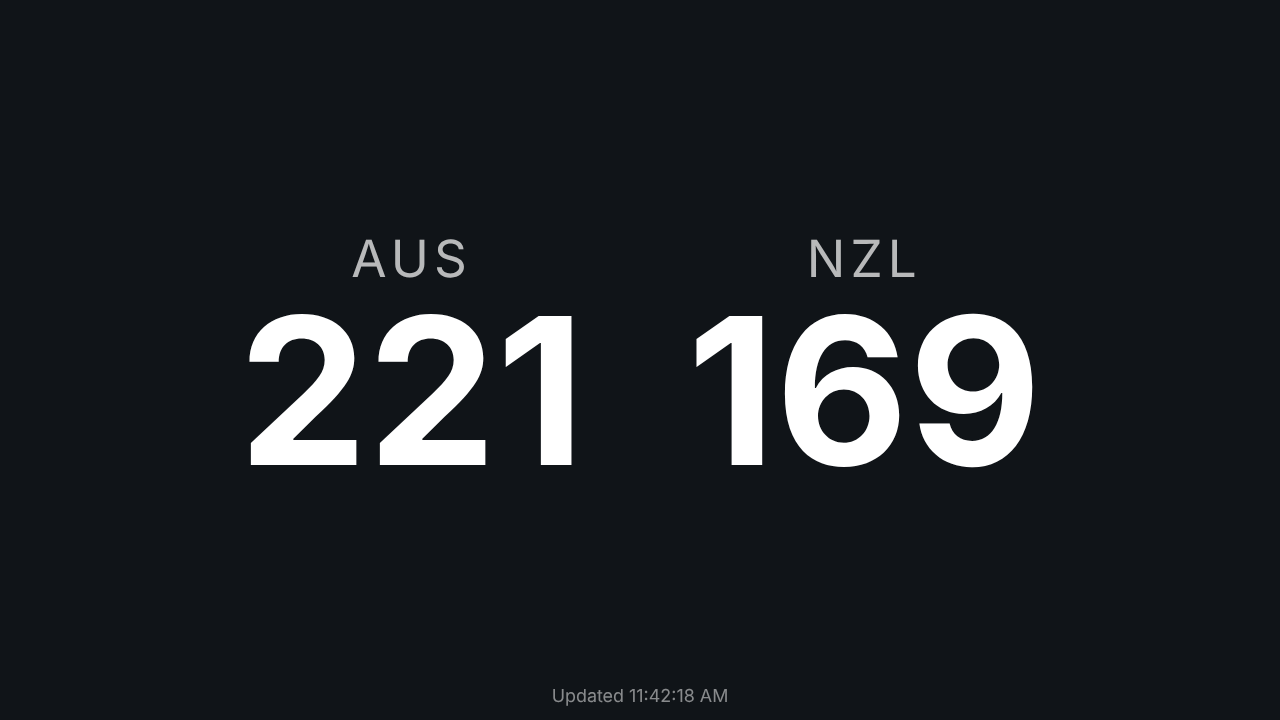
For a screen that changes the moment a result does, rather than every 15 seconds, run the SignalR listener from the previous section in server.mjs and pass the news on to the page. For a screen that writes, such as a marshal’s tablet that records DNFs, sign the server in with the PIN rather than handing the PIN to the browser, and let it forward only the requests the screen needs.
Exporting results files
For official results, use the export endpoints rather than assembling a file yourself. They apply the same rules as Export in the app:
| File | Endpoint |
|---|---|
| Results, IOF XML 3.0 | GET /manager/api/ResultsExport/{eventId}/iof-xml |
| Results, OJSON | GET /manager/api/ResultsExport/{eventId}/json |
| Start list, IOF XML / OJSON / CSV | .../iof-startlist-xml, .../startlist-json, .../startlist-csv |
| Entry list, IOF XML / OJSON / CSV | .../iof-entrylist-xml, .../entrylist-json, .../entrylist-csv |
curl -o results.xml "http://192.168.0.133:5154/manager/api/ResultsExport/2026-10-14.02/iof-xml?includeDidNotStart=true"An OJSON results file carries each competitor’s splits, as data:
{
  "person": {"givenName": "Sam", "familyName": "Okafor", "name": "Sam Okafor"},
  "organisation": {"id": 1, "name": "Bushflyers", "shortName": "BF"},
  "controlCards": [{"system": "SI", "number": 8001003}],
  "status": "OK",
  "startTime": "2026-10-14T10:02:00+00:00",
  "finishTime": "2026-10-14T10:09:34+00:00",
  "time": 454000,
  "position": 1,
  "timeBehind": 0,
  "splitSource": "card",
  "splits": [
    {"controlCode": 31, "status": "OK", "time": 110000},
    {"controlCode": 32, "status": "OK", "time": 220000},
    {"controlCode": 33, "status": "OK", "time": 380000}
  ]
}
A results file is refused with 409 Conflict while anyone in it has no settled result, and the answer names them:
{
  "messageKey": "resultsExport.unsettledResults",
  "message": "These results cannot be published until every competitor in them has a settled result.",
  "entries": [{"competitorId": 3, "name": "Sam Okafor", "className": "Open", "kind": "OnCourse", "status": "InForest"}]
}
That is deliberate: an official file should account for everybody. Settle them first, or add acceptUnsettled=true to publish anyway, which is what Ignore and continue does in the app. On an event with both relay and individual classes, also add kind=Relay or kind=Individual, because an export never mixes the two. classIds=1,4 limits the file to those classes. The files come back with no file name, so name them yourself (-o in curl).
When something goes wrong
Every refusal from the API has the same shape:
{"messageKey":"radioPunches.invalidCardNumber","messageArgs":{"value":"0"},"message":"Invalid card number."}message is a readable English sentence for your logs. messageKey is stable, so test that in code rather than the wording, which can change. messageArgs holds the values the message refers to.
| Code | Usually means |
|---|---|
200, 201, 204 | It worked. 204 has no body. |
400 | Something in the request is missing or invalid. The message says what. |
401 | A write without signing in, on a Manager with a PIN. The body is plain text, not JSON. |
404 | The event doesn’t exist, or the object you tried to change doesn’t. |
409 | Not now: another event is running, the event isn’t running, an id is taken, or results aren’t settled. |
207 | A delete found some of the ids you named but not all. |
Letting an AI assistant use it
meshO Manager also has a built-in Model Context Protocol endpoint at /manager/mcp, so an AI assistant such as Claude can read the live event, and optionally make changes, without you writing any code. It is off until you turn it on in Settings → AI assistants, and it is protected by the same PIN as the rest of the API. If what you want is to ask questions of your event (“who in M21 is still out?”), that is often quicker than a script.
Good practice
- Try it on a sample or a copy first. Install a sample event, or duplicate your event, and run your script against that.
- Prefer listening to polling. If you do poll, once every 30 to 60 seconds is plenty for results, and kind to a laptop that is also reading cards.
- Read, change, write. Never
PATCHpart of an object. - Keep the PIN out of your code. Read it from an environment variable.
- Check the version. This is the API meshO Manager’s own screens use, not a separately versioned public API, so it can change between releases as the app does.
GET /manager/api/Versiontells your script what it is talking to; test it against a new release before an important event. The export formats are the stable part: the OJSON format makes versioning promises of its own, and IOF XML is a standard. - Don’t run your experiment on the live event. Only one event can run on a Manager at a time, and a stray
DELETEis recorded in the audit trail but not undone by it.
If you build something useful on the API, we’d love to hear about it, and if you find something the API can’t do that it should, tell us on GitHub. meshO Manager is free to download and use.
Examples were run against meshO Manager 2026.3.4 with demonstration data, and the hill-climb screen against the change that shipped in 2026.10.15.01. Long responses are trimmed to the fields discussed, and the clock times in two outputs have been moved to the morning to match the rest of the example event. For the country examples, the sample event’s clubs were given a country each. Further reading in the meshO Manager documentation: Reaching the server, OJSON and AI assistants (MCP).